Titles without the brand or size
Vinted buyers search for a brand and an item, then filter by size. A title like "Lovely dress" doesn't match either.
Vinted listing generator
Type a few words or drop a photo. Quicklist AI writes a Vinted title and description in a friendly tone, picks the right category, and fills it all into Vinted in one click.
2 free listings · No sign-up · No card
levis 501 jeans W32 L30 medium wash, straight leg, button fly, very good condition, light fading, no rips
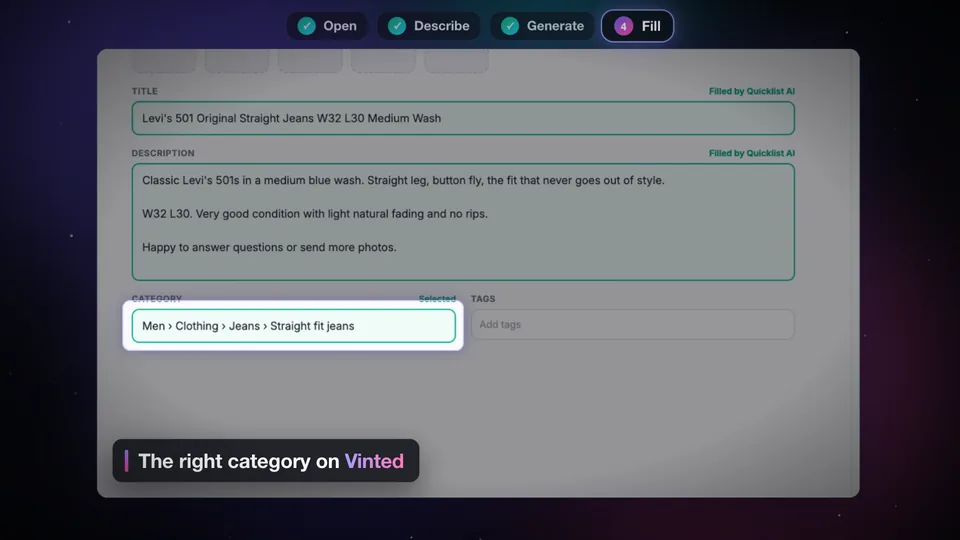
Levi's 501 Original Straight Jeans W32 L30 Medium Wash
Classic Levi's 501s in a medium blue wash. Straight leg, button fly, the fit that never goes out of style. W32 L30. Very good condition with light natural fading and no rips. Happy to answer questions or send more photos.
Men › Clothing › Jeans › Straight fit jeans
The problem
Vinted has no hashtags, so your title, description and category do all the work. Most listings leave at least one of them weak.
Vinted buyers search for a brand and an item, then filter by size. A title like "Lovely dress" doesn't match either.
Items in the wrong category disappear from filtered browsing, which is how many Vinted buyers shop.
One line leaves buyers asking about fit and condition, and on Vinted many don't ask. They move on.
Vinted rules
Vinted has no hashtags. Buyers find items through the title, the description and the category filters, so Quicklist AI gets all three right.
Quicklist AI writes Vinted titles of up to 100 characters with the brand, item, size and colour that buyers type into search.
With no hashtags on Vinted, the description does the work. Quicklist AI works the words buyers search for into natural sentences, never a list of keywords.
Items in the wrong category don't show up in filtered searches. Quicklist AI picks the category in Vinted's own menu when it fills the listing.
Vinted is person to person. Quicklist AI writes in a warm, casual voice by default, and works on vinted.com, vinted.co.uk, vinted.fr and vinted.de.
How it works
Start a new item on Vinted. The Quicklist AI side panel opens beside it and shows Vinted as detected.
A few words is enough: brand, item, size, condition. Or add a photo and let it read the details.
You get a Vinted title and description, written the way Vinted buyers search, plus a matching category.
The title, description and category go into Vinted's form. Add your photos, size and price, check it, and upload.
What you get
One Generate, one complete Vinted listing, ready to fill.
Brand, item, colour and size in up to 100 characters, the words Vinted buyers type.
Zara Linen Midi Dress Sage Green Size M
Fit, fabric, condition and occasions, in the warm, casual voice of person to person selling.
Lovely sage linen midi from Zara, size M. Worn twice, perfect for summer weddings or holidays.
Quicklist AI chooses the matching category in Vinted's own menu when it fills the listing.
Women › Clothing › Dresses › Midi dresses
Before and after
Tone and length
Pick the voice that fits your shop. On Vinted you can choose from these tones and three lengths.
Warm and friendly, the way Vinted sellers talk. The default on Vinted.
Clear and factual, for branded or higher priced items.
Casual and current, with the energy of resale culture.
I crosslist on Depop and Vinted. Having one tool that writes in the right tone for each saved me hours every week. The $2.99 plan pays for itself on the first sale.
Seller tips
What makes a Vinted listing sell, whether you write it yourself or with Quicklist AI.
That's the order Vinted buyers search.
Midi dresses, not just dresses. It's how buyers browse.
With no hashtags, the description carries the search words. Keep them natural.
Linen, wool, oversized, true to size: details that sell clothes.
Vinted is person to person. A warm tone gets more favourites and messages.
Our guide explains how Vinted shipping labels work.
Pricing
Start with 2 free listings, no sign-up and no card. Every plan covers all 10 marketplaces.
FAQ
Install the Quicklist AI Chrome extension and start a new item on Vinted. Type a few words about your item or add a photo, click Generate, then click Fill Listing. The title, description and category go straight into Vinted's form.
Yes. Tell it the brand, item, size and condition in a few words and it writes a full Vinted description in a friendly tone, short (about 450 characters), medium (about 900) or long (about 1,350).
Yes. When it fills the listing, Quicklist AI chooses the matching category in Vinted's category menu. You can always change it before you upload.
No. Vinted has no hashtag field, so Quicklist AI puts the words buyers search for into the title and description instead.
vinted.com, vinted.co.uk, vinted.fr and vinted.de.
Yes. Drop a product photo into the side panel and Quicklist AI reads the brand, item, colour and style from it, then writes the title and description.
It works on vinted.com, vinted.co.uk, vinted.fr and vinted.de.
No. Vinted has no hashtag field, so Quicklist AI works the words buyers search for into the title and description instead.
About 30 seconds. Opening the side panel, typing a few words and clicking Generate takes a few seconds, and Fill Listing puts it into Vinted's form straight away. Most of the time left is checking it and adding your photos and price.
Not from the writing. Quicklist AI writes in the tone Vinted buyers expect, only uses the details you give it, and you can edit any word before you fill. It never adds claims about the item that you didn't make.
Yes. Crosslisting apps copy a listing you've already written. Quicklist AI writes it, in Vinted's own format. Many sellers write the listing with Quicklist AI, then crosslist as usual.
Yes. Quicklist AI gives you 2 free listings with no sign-up and no card. Paid plans start at $2.99 a month for 30 listings, and every plan covers all 10 marketplaces.
Yes. The same extension writes listings for Poshmark, Depop, Mercari, eBay, Etsy, Grailed, Facebook Marketplace, Whatnot and Amazon, each in that site's own format. Vinted is one of 10.
Write it once. Sell more. Fill it in one click.
Add to Chrome, free2 free listings · No sign-up · No card