The title wastes its 80 characters
Titles like "Cute top!!" or "Super comfy leggings" give Poshmark search nothing to match. Buyers type a brand, an item and a size, and listings without them simply don't appear.
Poshmark listing generator
Type a few words or drop a photo. This Poshmark listing generator writes an 80 character title, a full description and 3 style tags, then fills them into poshmark.com in one click.
2 free listings · No sign-up · No card
lululemon align leggings 25 inch, size 6, black, worn a few times, no pilling
Lululemon Align High-Rise Pant 25" Black Size 6 Leggings
Lululemon Align High-Rise Pant with a 25" inseam in black, size 6. Soft, lightweight leggings made for yoga, workouts or everyday wear. Gently worn a few times, with no pilling.
The problem
Most closets don't have a pricing problem. They have a findability problem: the listing never shows up for the buyer looking for it.
Titles like "Cute top!!" or "Super comfy leggings" give Poshmark search nothing to match. Buyers type a brand, an item and a size, and listings without them simply don't appear.
Shoppers filter by size and skim for condition. When those are missing from the description, buyers ask questions, wait for an answer, or move on to the next closet.
Poshmark gives every listing 3 style tags. Leaving them blank means one less way into the listing for buyers browsing a look rather than a brand.
Poshmark rules
Poshmark buyers search by brand, item and size. Quicklist AI puts those where Poshmark looks first.
Poshmark titles stop at 80 characters. Quicklist AI fits the brand, item, key detail and size inside the limit, so nothing important gets cut.
Shoppers filter and search by brand and size. Quicklist AI leads the title with the brand and repeats the size and condition in the description.
Poshmark lets you add 3 style tags. Quicklist AI picks three that describe the look of the item and fills them into the style tag field.
Poshmark listings read best as plain, honest descriptions. Quicklist AI leaves emojis out and keeps descriptions up to about 1,350 characters.
How it works
Go to poshmark.com and start a new listing. The Quicklist AI side panel opens beside it and shows Poshmark as detected.
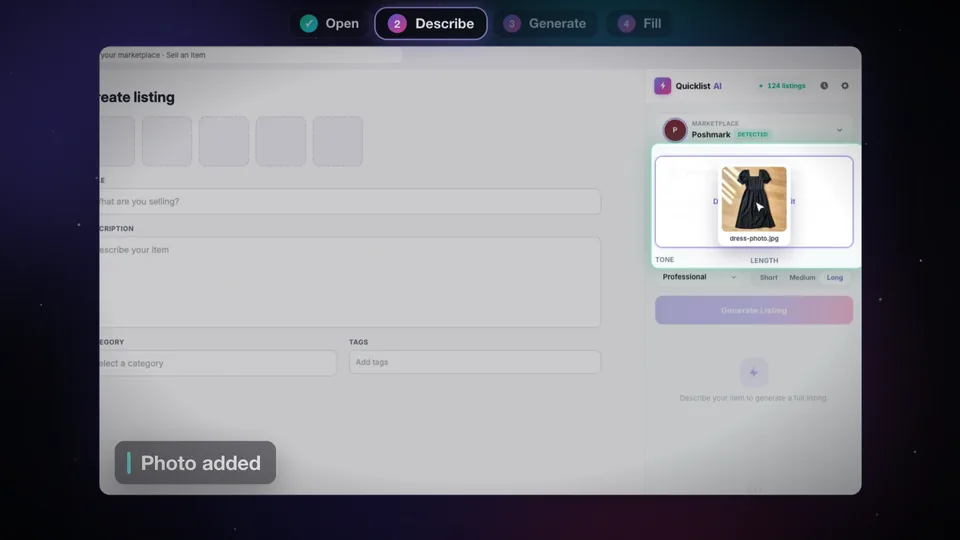
A few words is enough: brand, item, size, condition. Or add a photo and let it read the details.
You get an 80 character title, a description and 3 style tags, written for Poshmark search.
The title, description and style tags drop into Poshmark's form. Add your photos, price and category, check it, and post.
What you get
One Generate, one complete Poshmark listing, ready to fill.
Brand, item type, the detail that sets it apart, colour and size, in the order Poshmark shoppers search.
Madewell Perfect Vintage Jean 27 Medium Wash High Rise
Fit, fabric, condition and anything you mentioned about flaws, written as short, honest sentences.
High-rise Madewell Perfect Vintage Jean in a medium wash, size 27. Worn a handful of times, no fading or fraying at the hems.
Three tags that describe the look, written to the style tag field so you don't have to type them.
vintage · denim · everyday
Before and after
Tone and length
Pick the voice that fits your shop. On Poshmark you can choose from these tones and three lengths.
Clear and factual, for branded or higher priced items.
Friendly and plain, like a message to a buyer.
Polished and refined, for designer and premium pieces.
Casual and current, with the energy of resale culture.
Just the facts buyers filter by, in as few words as possible.
I used to spend 10 minutes per listing. QuickListAI does it in seconds and the quality is better than what I wrote myself. It knows exactly what Poshmark buyers search for.
Seller tips
What makes a Poshmark listing sell, whether you write it yourself or with Quicklist AI.
Poshmark search weighs the first words of the title. Brand, then item, then the key detail.
Buyers filter by size but still look for it in the text before they buy.
A small honest note avoids returns and makes the rest of the listing more believable.
Pick tags for the look, like minimalist or boho, not the brand you already have in the title.
Clean text reads as more trustworthy on Poshmark and keeps the description easy to scan.
A good listing still needs to be shared. Our Poshmark guides cover sharing routines and parties.
Pricing
Start with 2 free listings, no sign-up and no card. Every plan covers all 10 marketplaces.
FAQ
Install the Quicklist AI Chrome extension and start a new listing on poshmark.com. Type a few words about your item or add a photo, click Generate, then click Fill Listing. The title, description and style tags go straight into Poshmark's form.
Yes. Every title stays within 80 characters, with the brand and item first so the important words are never cut off.
Yes. It writes 3 style tags, Poshmark's limit, and fills them into the style tag field for you.
Yes. Drop a product photo into the side panel and Quicklist AI reads the brand, item, colour and style from it, then writes the title, description and style tags.
Yes. Poshmark listings can use any of the 5 tones: Professional (the default), Casual, Luxury, Trendy or Minimalist, in short, medium or long.
It's a Chrome extension, so it works on poshmark.com in Chrome on a Mac or Windows computer. Many sellers photograph on their phone, then write and fill listings on the computer, where it's faster.
Tell it the condition in your own words, like "new with tags" or "worn twice", and it writes that clearly into the description. It doesn't guess condition you haven't given it.
Yes. Paste the old title and description or describe the item again, and Quicklist AI writes a fresh version you can fill straight into the edit listing page.
About 30 seconds. Opening the side panel, typing a few words and clicking Generate takes a few seconds, and Fill Listing puts it into Poshmark's form straight away. Most of the time left is checking it and adding your photos and price.
Not from the writing. Quicklist AI writes in the tone Poshmark buyers expect, only uses the details you give it, and you can edit any word before you fill. It never adds claims about the item that you didn't make.
Yes. Crosslisting apps copy a listing you've already written. Quicklist AI writes it, in Poshmark's own format. Many sellers write the listing with Quicklist AI, then crosslist as usual.
Yes. Quicklist AI gives you 2 free listings with no sign-up and no card. Paid plans start at $2.99 a month for 30 listings, and every plan covers all 10 marketplaces.
Yes. The same extension writes listings for Depop, Mercari, eBay, Vinted, Etsy, Grailed, Facebook Marketplace, Whatnot and Amazon, each in that site's own format. Poshmark is one of 10.
Write it once. Sell more. Fill it in one click.
Add to Chrome, free2 free listings · No sign-up · No card