Descriptions that open with a greeting
"Hi! Selling this because..." pushes the brand and item out of the part buyers see in search results and feeds. The first few words need to say what it is.
Depop listing generator
Type a few words or drop a photo for an AI Depop listing in seconds: a description that opens with what buyers search for and 5 hashtags, filled into depop.com in one click.
2 free listings · No sign-up · No card
nike acg fleece full zip, forest green, 90s, tagged L fits M, p2p 24 length 28, slight fade, no holes
Vintage Nike ACG fleece jacket in forest green, 90s 🌲 Full zip with that chunky gorpcore feel. Tagged L, fits relaxed on an M. Pit to pit 24", length 28". Light fading from wear that honestly adds to the vintage look. No rips, stains or holes. Layer it over a hoodie or wear it on its own 🙌
The problem
Depop has no title field. The opening words of your description do that job, and most listings waste them.
"Hi! Selling this because..." pushes the brand and item out of the part buyers see in search results and feeds. The first few words need to say what it is.
Depop allows up to 5 hashtags. Generic tags or unrelated trending ones bring the wrong buyers, or none at all.
Listing five brands "for exposure" reads as keyword spam. Depop discourages it, and buyers scroll past it.
Depop rules
Depop listings follow different rules from Poshmark or eBay. Quicklist AI follows them on every listing.
Depop has no separate title field. Your title, description and hashtags share one 1,000 character box, and Quicklist AI writes inside it with room to spare.
The opening of your description is what buyers see first in search. Quicklist AI leads with the brand, the item and the detail people type, never a greeting.
Depop allows up to 5 hashtags. Quicklist AI mixes one broad tag with specific styles and eras that fit what you're selling, so you're found by the right buyers.
Depop treats unrelated brand names as keyword spam. Quicklist AI names the brands that are really on the item, one or two at most.
How it works
Go to depop.com and start a listing. The Quicklist AI side panel opens beside it and shows Depop as detected.
A few words is enough: brand, item, size, condition. Or add a photo and let it read the details.
You get a Depop description with the key words first and 5 hashtags at the end, all inside the 1,000 character limit.
The description and hashtags drop into Depop's form. Add your photos and price, check it, and post.
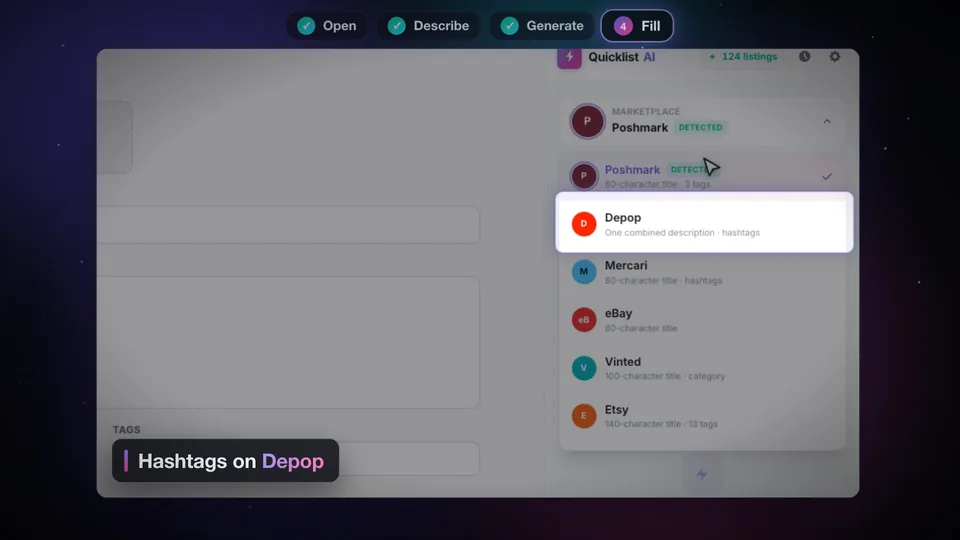
What you get
One Generate, one complete Depop listing, ready to fill.
Brand, item, era or style and the key detail, in the first words of the description, highlighted in our example above.
Vintage Carhartt Detroit Jacket in brown duck canvas, 90s...
Fit, measurements, condition and how to wear it, in the casual, current tone Depop buyers expect, with an emoji or two if you want them.
Fits boxy on an M. Pit to pit 25". Nice even fade, no rips 🤎
One broad tag and four specific ones for style, era and brand, all inside the 1,000 character box.
#vintagecarhartt #workwear #90s #detroitjacket #streetwear
Before and after
Tone and length
Pick the voice that fits your shop. On Depop you can choose from these tones and three lengths.
Casual and current, the way Depop shops talk. The default on Depop.
Clear and factual, for branded or higher priced items.
Friendly and plain, like a message to a buyer.
Just the facts buyers filter by, in as few words as possible.
I crosslist on Depop and Vinted. Having one tool that writes in the right tone for each saved me hours every week. The $2.99 plan pays for itself on the first sale.
Seller tips
What makes a Depop listing sell, whether you write it yourself or with Quicklist AI.
That's the part buyers see first. Brand, item, era.
Pit to pit and length sell vintage. Depop buyers rarely trust a tagged size alone.
One wide tag like #vintage, then the style, era and item.
Only brands that are really on the item.
How it fits and how to wear it helps buyers picture it, which is what Depop is about.
See our guide to relisting and refreshing on Depop.
Pricing
Start with 2 free listings, no sign-up and no card. Every plan covers all 10 marketplaces.
FAQ
Install the Quicklist AI Chrome extension and open a new listing on depop.com. Type a few words about your item or add a photo, click Generate, then click Fill Listing. The description and hashtags go straight into Depop's form.
Yes. Depop's title, description and hashtags share one 1,000 character field. Quicklist AI writes short (about 300 characters), medium (about 600) or long (about 900) descriptions, so there's always room for your hashtags.
Up to 5, which is Depop's limit. They're picked to match your item: one broad tag plus specific styles, eras or categories buyers search for.
On Depop the caption is the description. Quicklist AI writes it in full, from the first line buyers see in search to the hashtags at the end.
Yes. Drop a product photo into the side panel and Quicklist AI reads the brand, item, colour and style from it, then writes the description and hashtags.
Depop allows emojis, so the Trendy and Casual tones may add one or two. Choose Professional or Minimalist if you'd rather have none.
Yes. Add a photo and Quicklist AI reads the brand, item, colour and style, then writes the Depop description and 5 hashtags. Add measurements and condition in a few words for the best result.
Depop has no separate hashtag field, so Quicklist AI adds the 5 hashtags at the end of the description and counts them inside the 1,000 character limit.
Yes. The Professional, Casual and Minimalist tones keep emojis out. Trendy, the Depop default, may add one or two.
About 30 seconds. Opening the side panel, typing a few words and clicking Generate takes a few seconds, and Fill Listing puts it into Depop's form straight away. Most of the time left is checking it and adding your photos and price.
Not from the writing. Quicklist AI writes in the tone Depop buyers expect, only uses the details you give it, and you can edit any word before you fill. It never adds claims about the item that you didn't make.
Yes. Crosslisting apps copy a listing you've already written. Quicklist AI writes it, in Depop's own format. Many sellers write the listing with Quicklist AI, then crosslist as usual.
Yes. Quicklist AI gives you 2 free listings with no sign-up and no card. Paid plans start at $2.99 a month for 30 listings, and every plan covers all 10 marketplaces.
Yes. The same extension writes listings for Poshmark, Mercari, eBay, Vinted, Etsy, Grailed, Facebook Marketplace, Whatnot and Amazon, each in that site's own format. Depop is one of 10.
Write it once. Sell more. Fill it in one click.
Add to Chrome, free2 free listings · No sign-up · No card