
Getting approved to sell on Whatnot is straightforward. Running a stream that actually moves inventory takes a bit more prep. This guide walks you through every step from your first application to your first sale, with honest expectations for what your early shows will look like.
How to Get Approved as a Whatnot Seller
Whatnot requires seller approval before you can go live. The process is category-specific, so your path depends on what you plan to sell.
Go to whatnot.com, navigate to "Sell on Whatnot," and submit an application for your category. Vintage and streetwear sellers are typically approved quickly. Collector categories like trading cards, sneakers, and sports memorabilia have higher bars because Whatnot actively monitors for fakes and fraud.
What actually helps your approval odds:
- A populated Whatnot buyer profile with positive reviews
- Links to an existing resale presence (Poshmark, eBay, Depop, or a social account with inventory photos)
- Clear photos of the type of inventory you plan to sell
- A short written explanation of how you source and authenticate your items
Approval can take anywhere from a few days to a few weeks. If you are rejected, you can reapply once you have built more of a buyer history on the platform.
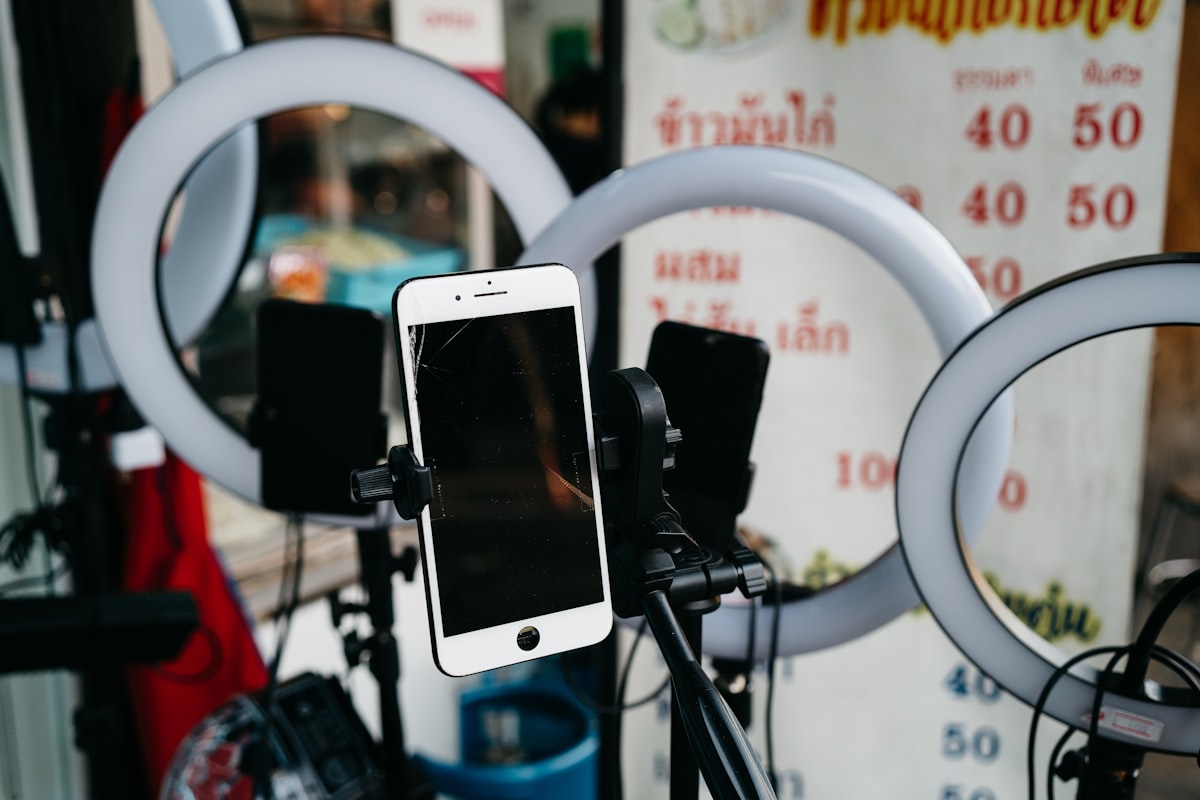
Equipment and Lighting for a Beginner Stream
You do not need a studio. Most successful early-stage Whatnot sellers use nothing more than a smartphone and a ring light. The fundamentals that matter are stability, light, and a clean background.
Phone mount. A flexible tripod or a dedicated phone mount that clamps to a shelf keeps your hands free to handle items. Wobbly or hand-held cameras hurt your viewer retention fast.
Lighting. A single ring light or two soft box lights positioned in front of you is enough. The goal is even light with no harsh shadows on the items. If you want a budget setup that costs under $30, see these reseller lighting options.
Background. A clean wall, a pegboard with organized shelves, or a fabric backdrop all work. Cluttered backgrounds make items harder to see and signal to buyers that you are disorganized.
Internet. A wired connection is best. If you are on Wi-Fi, get as close to your router as possible and avoid streaming during peak household usage hours.
Your phone’s native camera is fine. You do not need a capture card or dedicated streaming camera for your first several shows.
Prepping Your Inventory and Setting Prices
Going live with unprepared inventory is one of the most common beginner mistakes. You want to pick up an item, know what it is, show it quickly, and describe it confidently. That requires prep work done before the stream starts.
Sort and stage your inventory. Organize items in the order you plan to sell them. Use bins, hangers, or numbered bags so you are never fumbling on screen.
Research sold prices. Check sold comps on eBay and Whatnot itself before you price anything. Whatnot buyers know the market. Overpriced items stall shows. For guidance on pricing items when comps are thin, this reseller pricing playbook is a practical reference.
Prep your titles and descriptions ahead of time. Whatnot lets you set up your show inventory in advance through the Seller Dashboard. Writing a good auction title for 30 items one at a time is slow. Using the Whatnot AI listing generator lets you generate optimized titles and show descriptions quickly, so you enter the stream with clean copy already loaded.
Build in a starting price floor. Your starting auction price should be the minimum you would accept, not a teaser number you regret. Auctions can go higher, but they will not go lower.
Auction vs. Buy-It-Now: When to Use Each
Whatnot supports both live auctions and fixed-price buy-it-now listings. Understanding when to use each changes how your shows flow and how much you earn.
Live auctions are the default format and the reason most buyers show up to Whatnot. Auctions create urgency. Competitive bidding on desirable items can push prices well above comp value. Use auctions for items with clear demand: brand names, graded cards, authenticated pieces, trending categories.
Buy-it-now works best for lower-ticket items where you know the price and just want them off the shelf. It also works for bundle deals you want to offer mid-stream to reward engaged viewers. Setting up a buy-it-now section before or after your auction run gives buyers something to browse while you talk.
A common pattern for new sellers: run a short buy-it-now phase for 5 to 10 minutes at the start to warm up the room, then switch to live auctions for the main event.
Running the Show: What to Actually Do On Stream
Your first stream will feel awkward. That is normal. Experienced Whatnot sellers look comfortable because they have done it many times, not because streaming is natural.
A few things that help early shows go better:
Keep the pace moving. Spend 60 to 90 seconds per item at most. Long pauses kill energy. If bids stall, narrate the item, add context, then close and move on.
Talk constantly. Describe what you are holding, explain why it is interesting, call out visible details and any flaws. Buyers cannot touch items. Your narration is their inspection.
Acknowledge the chat. Greet viewers by name when they arrive. Answer questions immediately. Engagement drives the algorithm. A chatty stream surfaces in more feeds.
Show prep matters more than performance. Read the Whatnot show prep checklist before your first stream. The difference between a smooth show and a chaotic one is almost entirely what you did in the hour before going live.
Handle problems calmly. Items will not scan. Bids will be placed by mistake. Buyers will ask off-topic questions. Staying calm and professional on screen is what separates sellers who build a following from those who have one rough stream and stop.
What Realistic Beginner Expectations Look Like
Your first show will probably have a small audience, slow bids, and at least one technical hiccup. That is standard. Whatnot is a discovery-based platform and new sellers do not surface in the main feed until they have a show history and reviews.
Early traction comes from:
- Sharing your stream link to your existing social audience
- Going live consistently on a regular schedule so buyers know when to find you
- Selling items people actually want to buy, priced fairly based on comps
Retention builds over multiple shows. Buyers who have a good experience will follow you and return. Your second and third shows will perform better than your first if you commit to improving your setup and your prep.
For context on where Whatnot fits relative to other live selling platforms, the Whatnot vs Poshmark Shows vs TikTok Shop Live comparison is worth reading before you decide how much energy to invest.
If you want to understand what the platform keeps from each sale before you commit, start with Whatnot fees and payouts explained so your pricing math is right from day one.
Choosing what to sell matters too. The best categories to sell on Whatnot covers where demand is strongest in 2026 and which niches have room for new sellers to establish themselves.
Write Whatnot Auction Titles in Seconds with QuickListAI
QuickListAI’s Chrome extension writes your Whatnot auction titles and show descriptions automatically so you can prep inventory faster and spend more time on stream. 2 free listings, no credit card required.
Add to Chrome, FreeFrequently asked questions
No dedicated hardware is required. A smartphone with a stable mount, a ring light, and a reliable internet connection is enough to run a competitive show. Upgrade your setup as your revenue grows.
Approval time varies by category and usually ranges from a few days to a few weeks. Having an established buyer profile and existing inventory photos speeds up the process.
Most new sellers benefit from using buy-it-now to warm up the room at the start of a show, then switching to live auctions for the main inventory run. Auctions drive the most engagement and the highest prices for in-demand items.
Aim for 20 to 40 items for a 60 to 90 minute show. More than that and you risk rushing; fewer and the show can feel thin. Stage items in order before you go live so transitions are smooth.
Share your stream link on Instagram, TikTok, or wherever your audience already follows you. Go live on a consistent schedule so buyers know when to expect you. Engage with chat actively during the show. Early streams rely on your own promotion because new sellers do not surface prominently in the Whatnot discovery feed.
Honor the sale. Canceling bids or refusing to sell at the winning price damages your reputation and can result in account penalties. Set a starting price floor you can live with before each item goes to auction.